Home • Help • Administrator Tools
User Management
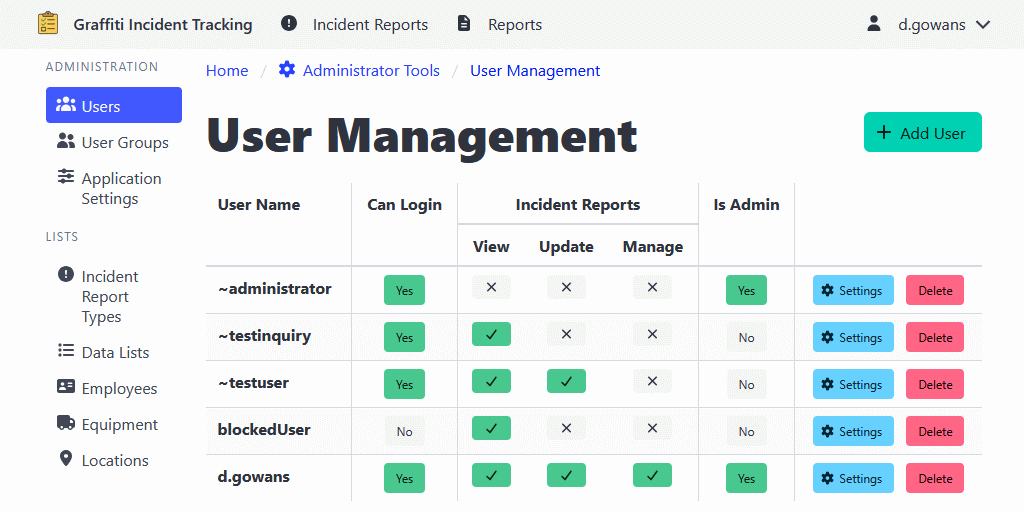
The User Management section allows administrators to create, edit, and manage user accounts for the ShiftLog application.
Note: ShiftLog is flexible in the way it can authenticate users, but the application does not manage passwords.
Adding a User
- Navigate to Administrator Tools > Users.
- Click the Add User button.
- Enter the user name.
- Click Add User to create the user.
The user will start with no permissions.
Editing a User
- Navigate to Administrator Tools > Users.
- Find the user you want to edit.
- Main section access permissions can be updated by toggling the view/update/manage buttons.
- Additional settings can be found by clicking the Settings button.
User Permissions
Users can have different levels of access for each section:
- Inquiry Only: View-only access to records
- Update: Can create and edit records
- Manage: Full access including administrative functions (e.g., record recovery)
Deleting a User
- Navigate to Administrator Tools > Users.
- Find the user you want to delete.
- Click the Delete button.
- Confirm the deletion.